Page 1 of 1

anyone knows how to get this? (the little cap on antenna)

Posted: Wed Jun 03, 2015 6:49 pm
by 373981094
Image

Hi, I recently bought a shark fin antenna (GPS, DAB etc..) and I am wondering does anyone know the name of the little blue cap that shows in the picture? Also where to get one? Thanks

Ok guys, thanks for your replies but I think there is some misunderstanding here so I think I should make it more clear. So basically I bought this antenna, part number 6R0035501D, It comes with base and mast but no blue cap, but I prefer to remove the mast and put something smaller on it so that it can look more like a shark fin, so, I am wondering if anyone has any idea what can I use to replace my mast ? ( I was thinking buy a blue cap somewhere and put it on the mast hole but now it seems to make more sense that the cap is just to keep the hole away from dirty during shipping! LOL)

Re: anyone knows how to get this? (the little cap on antenna

Posted: Wed Jun 03, 2015 6:52 pm
by grem
Correct me if I am wrong but I think you will find this is a protective cap and it is where your aerial is meant to screw in ? :?

Re: anyone knows how to get this? (the little cap on antenna

Posted: Wed Jun 03, 2015 6:55 pm
by 373981094
grem wrote:Correct me if I am wrong but I think you will find this is a protective cap and it is where your aerial is meant to screw in ? :?
yes it is, it replace the mast and cover the hole that were for mast, I just personally think that way it looks better :)

Re: anyone knows how to get this? (the little cap on antenna

Posted: Wed Jun 03, 2015 7:02 pm
by Dink
but if you bought a shark fin it won't have the hole ??

you could try and find out the thread of the antenna and search for a blank plug

Re: anyone knows how to get this? (the little cap on antenna

Posted: Wed Jun 03, 2015 10:44 pm
by Mart!n-GTI-DK
grem wrote:Correct me if I am wrong but I think you will find this is a protective cap and it is where your aerial is meant to screw in ? :?
Exactly. The blue cap is just to keep dirt from getting in the hole during shipping. It's ment to be thrown away when you screw the aerial in place. :)

Re: anyone knows how to get this? (the little cap on antenna)

Posted: Mon Jul 20, 2026 12:05 am
by s0234
Quick question. I know this post is around 11 years old but I bought the 6R0035501D aerial and DAB just doesn't seem to be working. GPS and FM/AM works fine but DAB not at all. I don't have the mast so I was wondering if that's why or if it's something to do with the headunit. I'm using a PQ MST2 (5C0 035 680G). Maybe someone else has had the same issue and has a solution or maybe I'm just being stupid and need the mast

Re: anyone knows how to get this? (the little cap on antenna)

Posted: Mon Jul 20, 2026 8:23 am
by ciclo
You don't need the rod/mast for the DAB radio to work.

- Check the 5F unit's coding in a few bytes ('DAB installed'). Use VCDS, VCP, ODIS, etc.
- Check the continuity of the DAB cable (black connector) at both ends with a multimeter.

Perform the test in a location where you know there is good DAB reception.

Re: anyone knows how to get this? (the little cap on antenna)

Posted: Mon Jul 20, 2026 11:19 pm
by s0234
ciclo wrote: Mon Jul 20, 2026 8:23 am You don't need the rod/mast for the DAB radio to work.

- Check the 5F unit's coding in a few bytes ('DAB installed'). Use VCDS, VCP, ODIS, etc.
- Check the continuity of the DAB cable (black connector) at both ends with a multimeter.

Perform the test in a location where you know there is good DAB reception.
Thanks, weirdly enough there's no specific DAB installed byte, atleast as far as I can see and there is not supported FEC for DAB but I do have the port and DAB is an option in the radio menu
Regarding checking with the multimeter, how would I go about this since its surely too small to fit the prongs in?

Re: anyone knows how to get this? (the little cap on antenna)

Posted: Tue Jul 21, 2026 4:04 am
by ciclo
No FEC is required for DAB to work on this unit.
The DAB option must be selected in the radio menu (manually or automatically).

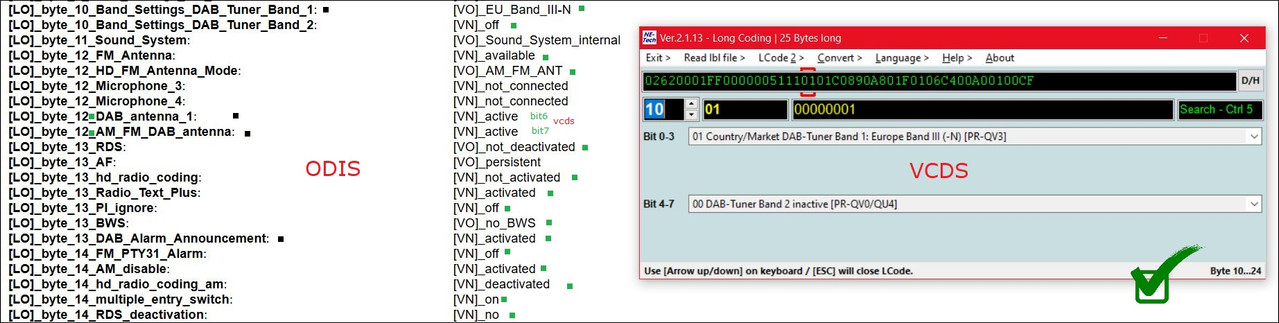
Your 5F coding should look like this:
Image

[LO]_byte_10_Band_Settings_DAB_Tuner_Band_1: [VO]_EU_Band_III-N
[LO]_byte_10_Band_Settings_DAB_Tuner_Band_2: [VN]_off
[LO]_byte_11_Sound_System: [VO]_Sound_System_internal
[LO]_byte_12_FM_Antenna: [VN]_available
[LO]_byte_12_HD_FM_Antenna_Mode: [VO]_AM_FM_ANT
[LO]_byte_12_Microphone_3: [VN]_not_connected
[LO]_byte_12_Microphone_4: [VN]_not_connected
[LO]_byte_12_DAB_antenna_1: [VN]_active
[LO]_byte_12_AM_FM_DAB_antenna: [VN]_active
[LO]_byte_13_RDS: [VO]_not_deactivated
[LO]_byte_13_AF: [VO]_persistent
[LO]_byte_13_hd_radio_coding: [VN]_not_activated
[LO]_byte_13_Radio_Text_Plus: [VN]_activated
[LO]_byte_13_PI_ignore: [VN]_off
[LO]_byte_13_BWS: [VO]_no_BWS
[LO]_byte_13_DAB_Alarm_Announcement: [VN]_activated
[LO]_byte_14_FM_PTY31_Alarm: [VN]_off
[LO]_byte_14_AM_disable: [VN]_activated
[LO]_byte_14_hd_radio_coding_am: [VN]_deactivated
[LO]_byte_14_multiple_entry_switch: [VN]_on
[LO]_byte_14_RDS_deactivation: [VN]_no
[LO]_byte_14_AF_deactivation: [VN]_no

If your multimeter's test leads are too thick, use thinner ones or get creative. I've never had any problems performing these checks with a standard multimeter and decent test leads... 🤷‍♂️

Re: anyone knows how to get this? (the little cap on antenna)

Posted: Fri Jul 24, 2026 2:25 pm
by s0234
ciclo wrote: Tue Jul 21, 2026 4:04 am No FEC is required for DAB to work on this unit.
The DAB option must be selected in the radio menu (manually or automatically).

Your 5F coding should look like this:
Image

[LO]_byte_10_Band_Settings_DAB_Tuner_Band_1: [VO]_EU_Band_III-N
[LO]_byte_10_Band_Settings_DAB_Tuner_Band_2: [VN]_off
[LO]_byte_11_Sound_System: [VO]_Sound_System_internal
[LO]_byte_12_FM_Antenna: [VN]_available
[LO]_byte_12_HD_FM_Antenna_Mode: [VO]_AM_FM_ANT
[LO]_byte_12_Microphone_3: [VN]_not_connected
[LO]_byte_12_Microphone_4: [VN]_not_connected
[LO]_byte_12_DAB_antenna_1: [VN]_active
[LO]_byte_12_AM_FM_DAB_antenna: [VN]_active
[LO]_byte_13_RDS: [VO]_not_deactivated
[LO]_byte_13_AF: [VO]_persistent
[LO]_byte_13_hd_radio_coding: [VN]_not_activated
[LO]_byte_13_Radio_Text_Plus: [VN]_activated
[LO]_byte_13_PI_ignore: [VN]_off
[LO]_byte_13_BWS: [VO]_no_BWS
[LO]_byte_13_DAB_Alarm_Announcement: [VN]_activated
[LO]_byte_14_FM_PTY31_Alarm: [VN]_off
[LO]_byte_14_AM_disable: [VN]_activated
[LO]_byte_14_hd_radio_coding_am: [VN]_deactivated
[LO]_byte_14_multiple_entry_switch: [VN]_on
[LO]_byte_14_RDS_deactivation: [VN]_no
[LO]_byte_14_AF_deactivation: [VN]_no

If your multimeter's test leads are too thick, use thinner ones or get creative. I've never had any problems performing these checks with a standard multimeter and decent test leads... 🤷‍♂️
You legend, now its all showing up. Thanks, turns out I had band 2 enabled

Re: anyone knows how to get this? (the little cap on antenna)

Posted: Fri Jul 24, 2026 5:04 pm
by ciclo
Excellent, easy solution!
Thank you so much for your report. 🤝