Page 1 of 1
Sat nav help!
Posted: Thu Feb 03, 2022 12:49 pm
by Robynneeliza
Hi, I have a 2017 polo match edition and have been looking at getting a maps SD card online as I work in the community and thought it would be easier for me than trying to work google maps/waze on a small phone screen. I have checked my infotainment system model and it says it is compatible online but on the right hand side I dont have the 'NAV' button like in some of the pictures online and in the manual. Instead mine says 'SETUP'. I have looked through some of the settings but can't seem to work it out. Does anyone know if my car is compatible and how this would work/how I would access the nav part.
Thanks

Re: Sat nav help!
Posted: Thu Feb 03, 2022 1:40 pm
by SRGTD
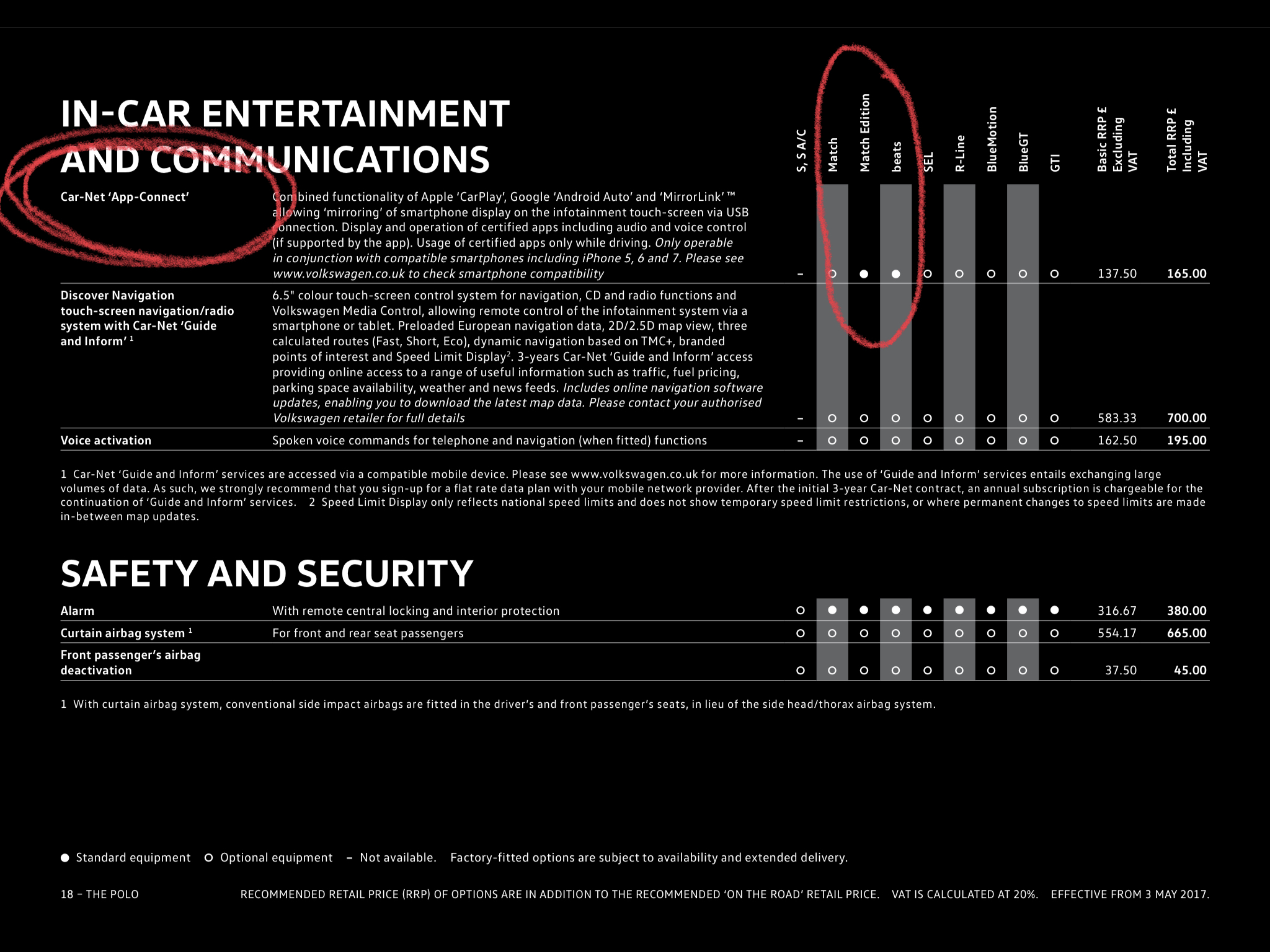
There were two different infotainment units used in the 6c Polo (late 2014 to 2017 cars) - the standard version was the Composition Media and the extra cost (£700) factory fit option was the Discover Navigation Unit. If the infotainment unit in your car doesn’t have a ‘Nav’ button alongside the screen, then your car has the standard Composition Media unit which doesn’t have Sat Nav built in.
However, you should have Car Net App Connect - see screen shot below from the May 2017 price list and spec brochure for the 6c Polo. App Connect was standard on the Match Edition model for 2017 model year cars, so assuming your car was built after production week 22 in 2016 you should have it. App Connect will enable you to display Google Maps / Waze on your infotainment screen via the App Connect function when your phone is plugged into the USB socket by the gear lever. I no longer have my 6c Polo but from memory, I think App Connect is accessed via the ‘Menu’ button alongside the infotainment screen in your car - press the ‘Menu ‘ button and you should see an App Connect icon.
- AA77E0B0-57A9-4DEE-9FA9-C50C4E316970.jpeg (1011.73 KiB) Viewed 2563 times