In-Car-Compuer(Complete)-

Discuss In Car Entertainment
User avatar
polo_dude
Gold Member
Posts: 519
Joined: Tue Oct 24, 2006 5:37 pm
Location: NW London

Post by polo_dude »

Took a few pics for you mate! Quickly ran in and shoved the PC in it's place :lol:

It's placed all in the glove box. The sliver metal box is the PSU and well i guess you know what the computer is. :P

Image

Image

Image

Just like to say Thanks to everyone who helped!!!, Wouldn't have completed this project without you lot!

Cheers :D :D
Yallan
User avatar
Tim_GTi
Post Whore
Posts: 12289
Joined: Mon Jun 25, 2007 6:31 pm
Location: Newport, South Wales
Contact:

Post by Tim_GTi »

Nice, you should build a proper install for it in your glovebox! 8)

Looks great though well done mate,
User avatar
polo_dude
Gold Member
Posts: 519
Joined: Tue Oct 24, 2006 5:37 pm
Location: NW London

Post by polo_dude »

Link for those who missed it on the 7th page:

http://video.google.co.uk/videoplay?doc ... 5&hl=en-GB
User avatar
polo_dude
Gold Member
Posts: 519
Joined: Tue Oct 24, 2006 5:37 pm
Location: NW London

Post by polo_dude »

User avatar
Tim_GTi
Post Whore
Posts: 12289
Joined: Mon Jun 25, 2007 6:31 pm
Location: Newport, South Wales
Contact:

Post by Tim_GTi »

Looking good mate, loving the function where you can layer songs!

Not a fan of the music though :P
Last edited by Tim_GTi on Sun Feb 24, 2008 9:05 pm, edited 1 time in total.
david burton
Bling Bling Diamond Member
Posts: 3082
Joined: Wed Aug 06, 2003 2:31 pm
Location: Reading
Contact:

Post by david burton »

the demo looks fantastic - good work. total cost?

would love to have the time and inclination to fit one of these and replace all the sat nav etc. I'd have to make sure I wasn't going to sell the car in a few years tho!
User avatar
polo_dude
Gold Member
Posts: 519
Joined: Tue Oct 24, 2006 5:37 pm
Location: NW London

Post by polo_dude »

@ david burton: Give or take around about £500 mate!, Got a bargin on the actual PC grabbed that for £270 with the PSU. If i bought the Pc from a main dealer would have cost me £560 alone!
nickm
New
Posts: 43
Joined: Mon Sep 10, 2007 7:25 pm
Location: Salisbury

Post by nickm »

Just want to say congrats on your completed project!!!

My install in my beeza should take place over Easter, just need to get some power cables and im away.

Nick
User avatar
Tim_GTi
Post Whore
Posts: 12289
Joined: Mon Jun 25, 2007 6:31 pm
Location: Newport, South Wales
Contact:

Post by Tim_GTi »

Keep us posted!
Mike-Mk4
New
Posts: 46
Joined: Sat Jan 05, 2008 12:20 am
Location: Kent
Contact:

Post by Mike-Mk4 »

Nice one mate.

That is quality.
User avatar
polo_dude
Gold Member
Posts: 519
Joined: Tue Oct 24, 2006 5:37 pm
Location: NW London

Post by polo_dude »

nickm wrote:Just want to say congrats on your completed project!!!

My install in my beeza should take place over Easter, just need to get some power cables and im away.

Nick
Yep keep us updated mate!
Nice one mate.

That is quality.
Cheers!
User avatar
polo_dude
Gold Member
Posts: 519
Joined: Tue Oct 24, 2006 5:37 pm
Location: NW London

Post by polo_dude »

I'm back again guys!, except to add on to the car PC. Possibly another quick project? Now what i had in mind was connecting a Car Sub-Woofer and Amp to the CarPC. Once again a whole load of research and I think it may be easier than I thought! Found this link. Clicky Excluding all the PSU that he has, I'd just be able to connect the Amp straight to the car's battery. Now the problem that I've stumbled across is this "monster cable" he's banging on about. Where would i need to connect this on the amp?? :?

Cheers
User avatar
Tim_GTi
Post Whore
Posts: 12289
Joined: Mon Jun 25, 2007 6:31 pm
Location: Newport, South Wales
Contact:

Post by Tim_GTi »

It was a fairly long read and I got lazy :P , what cable's this?
User avatar
polo_dude
Gold Member
Posts: 519
Joined: Tue Oct 24, 2006 5:37 pm
Location: NW London

Post by polo_dude »

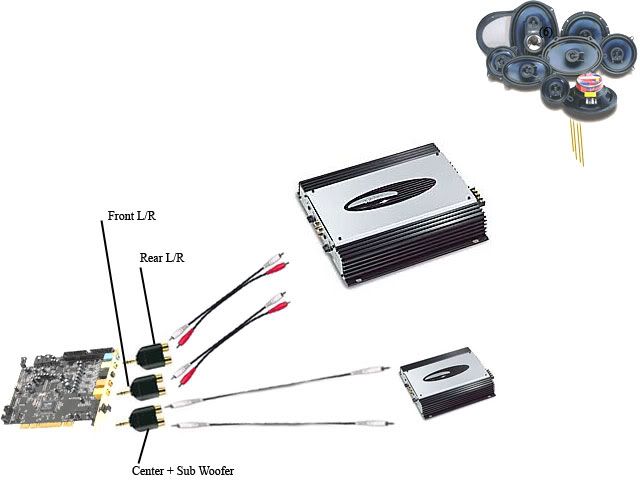
Haha!.Beats me mate, was so bloody confused with this guys tutorial! However found this wiring diagram on MP3car.com. Which was pretty usefull!

Image

It's basically just like wiring a normal subwoofer Up. Except instead of wiring the Amp to the Headunit I just write the subwoofer to the Pc 8)

All i need is the Phono to Dual Phono(RCA) adapter and then i'm of!

8)

Think i may do it after Exams though :(
Cheers.
User avatar
Tim_GTi
Post Whore
Posts: 12289
Joined: Mon Jun 25, 2007 6:31 pm
Location: Newport, South Wales
Contact:

Post by Tim_GTi »

Ah sweet, does your card support seperate centre, right and left inputs then?
Post Reply