I cant add photos in a post ?
-
babar91234
- New
- Posts: 9
- Joined: Wed Apr 13, 2016 4:12 pm
- Drives: polo r line
- Location: london
I cant add photos in a post ?
i tried to start a new thread but it wouldnt allow me to add any photos ?
-
nats148
- Bronze Member
- Posts: 236
- Joined: Tue Oct 13, 2015 3:35 pm
- Drives: 2015 1.8 GTI - Golf Anniversary
- Location: Lincolnshire
Re: I cant add photos in a post ?
I use the Photobucket app then just share the IMG code from it to the post
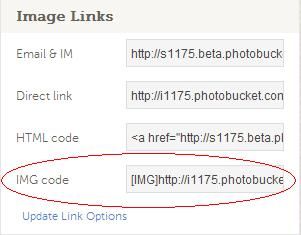

Code: Select all
[URL=http:// s1175.photobucket.com/user/anniversarygolf/media/Uploading%20Pics/Link.jpg.html][IMG]http://i1175.photobucket.com/albums/r628/anniversarygolf/Uploading%20Pics/Link.jpg[/IMG][/URL] -
CNK

- Gold Member
- Posts: 634
- Joined: Mon Apr 06, 2015 10:18 pm
- Drives: 6R
- Location: https://polo.blue/
- Contact:

-
haflidij
- Silver Member
- Posts: 287
- Joined: Sun Oct 04, 2015 2:58 pm
- Drives: Polo 1.4 2013 6R
- Location: Iceland
Re: I cant add photos in a post ?
You are supposed to do it like this.nats148 wrote:I use the Photobucket app then just share the IMG code from it to the post
Code: Select all
[URL=http:// s1175.photobucket.com/user/anniversarygolf/media/Uploading%20Pics/Link.jpg.html][IMG]http://i1175.photobucket.com/albums/r628/anniversarygolf/Uploading%20Pics/Link.jpg[/IMG][/URL]
Upload a photo to any website that you can f.x. tinypic.
Then after youve done that copy the link and do it like this :
Leave the 20% thing out, just put a link in there.
Also if you are using the photobucket app leave out the [IMG] and just copy from where the https:// starts.